
Cookidoo's New AI Assistant Knows 100,000 Recipes. It Couldn't Find Salmon en Croute.
It can plan a lovely dinner party. A week of balanced meals is another matter.
Cookidoo®'s new AI Assistant has arrived in Australia, and I did what any reasonable woman with a Thermomix® would do. I tried to catch it out. It took two mornings, because the Assistant has a daily question limit and I kept hitting it.
I planned a dinner party, rejected it, invited a salmon-eating guest and abandoned the lot for an Arabic feast. Then I spent the second morning trying to get a week of balanced lunches and dinners out of it. Its dinner party skills are genuinely impressive. Its meal planning needs a closer eye than it lets on.
So what is it, exactly?
The Assistant is a chat window in the Cookidoo app on your phone or tablet, not on the Thermomix screen. You type or speak in ordinary language, and it answers with recipes from Cookidoo's library of more than 100,000. It's included in a Cookidoo subscription, and if you can't see it yet, update the app.
Just trying to find it in the app? Skip to the quick answers ↓
Because it only suggests Cookidoo recipes, it's useful whichever Thermomix you own. TM7 and TM6 owners can send recipes to the planner for Guided Cooking, TM5 owners can do the same by syncing a Cook-Key® (though recipes written only for newer models won't run), and TM31 owners can still use Cookidoo to find compatible recipes and follow the steps manually.
The dinner party test
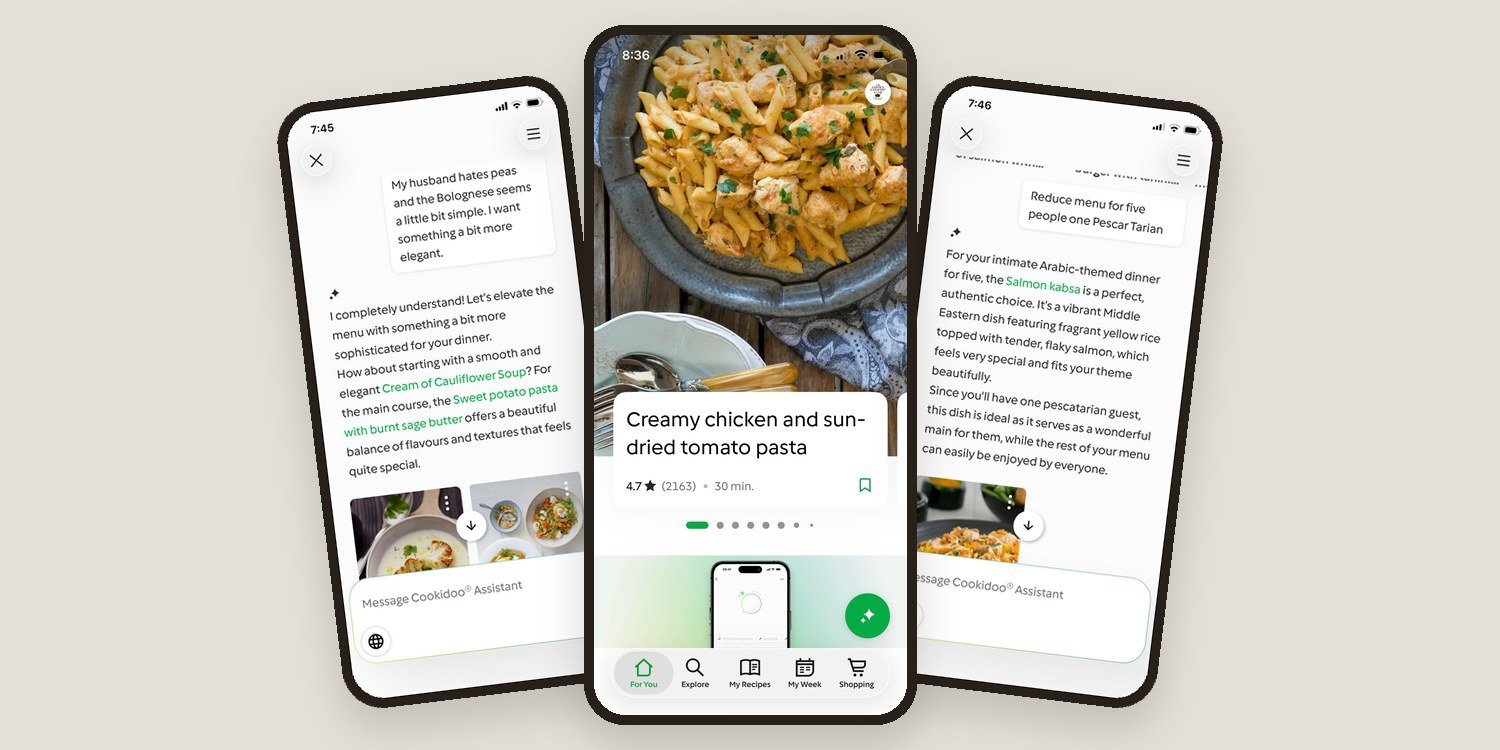
I started with: "I need a vegetarian menu for six people for dinner in under 30 minutes." It offered pea and mint soup followed by lentil bolognese. Perfectly sensible, and entirely unsuitable, because my husband hates peas.
So I told it that, and added that the bolognese seemed a bit simple. It came straight back with cream of cauliflower soup and sweet potato pasta with burnt sage butter. Much better.


This is the Assistant at its best. When the brief changes, you keep talking, the way you would to a friend who happens to know 100,000 recipes. I added a melted brie starter, then discovered one guest eats salmon, then decided I had up to an hour. I even hit send halfway through typing "what about salmon wrapped in," and it correctly guessed pastry.
Then it told me, with complete confidence, that Cookidoo had no recipe for salmon in pastry. A plain search for "salmon en croute" found three, one rated 4.7 from 157 reviews. When you know exactly what you want, the ordinary search bar is still the better tool.


So I abandoned the whole plan and asked for "an authentic Arabic themed night for eight people, most of the prep done ahead." It laid out a make-ahead spread of baba ghanoush, muhammara and Lebanese-style hummus with gluten-free pita, a spiced lamb roast as the centrepiece, and tabbouleh alongside. When I trimmed the numbers to five with one "Pescar Tarian" guest (autocorrect's contribution, not mine), it understood perfectly and suggested salmon kabsa, a traditional spiced rice dish from the Gulf.


By then the numbers had started to blur. It described one salmon dish as perfect for my "dinner party of six" and my "group of eight" in the same answer, so keep an eye on quantities.
The meal planning test
Dinner parties are the fun end of cooking. The harder job is getting protein and vegetables onto the table on an ordinary weeknight, and plenty of people have started meal planning with ChatGPT. Doing it inside Cookidoo should be better, because every recipe is Thermomix-tested and can go straight into your planner.
My first brief asked for five days of lunches and dinners for two, with a calorie ceiling, around 25 to 30 grams of protein per meal, plenty of vegetables and dinners under 45 minutes. It produced a plan in seconds, with a high-protein egg bake, turkey and mushroom roulade, coconut turmeric fish curry and prawn arrabbiata with zucchini noodles. It looked the part, but it gave me no nutrition figures to check it against, and I hadn't mentioned fibre. So the next morning I tried again.
This time I asked for around 30 grams of protein and at least 8 grams of fibre per meal, with legumes or whole grains, and the nutrition figures for each recipe. It can do this, as it turns out. It produced a table of protein, fibre and calories per serve, revised the plan to fit my calorie ceiling when asked, and its arithmetic added up.
Its honesty was another matter. The final version promised "ample fibre per meal" above a table showing eight of the ten recipes under 8 grams, some under 5. An earlier version in the same reply repeated two recipes I'd asked it not to repeat, and a note admitting the fibre shortfall trailed off mid-sentence into yet another version of the plan. The menu also leaned heavily on Asian pork dishes.


So I went again in a fresh conversation, adding three more rules: recipes rated 4.5 stars or more from at least 200 reviews, 45 minutes or less per dish, and no more than two meals from any one cuisine or protein. I also asked it to tell me which requirements it relaxed.
The cuisines improved immediately, with Spanish chicken stew, chicken gyros and a seafood chowder in the mix. It admitted to relaxing the review count, and said fibre and calorie figures "are not always available for every recipe," so it had picked meals "known for being wholesome" instead. It didn't mention that both versions of the plan it produced leaned on chicken well past my limit of two.
Then I opened two of its picks. The chicken Waldorf salad and the steamed salmon with garlic butter, paired on the same day, blew well past my calorie ceiling between them, and neither reached 8 grams of fibre. The nutrition information it said wasn't available was right there on both recipe cards.


Through a Catalyst Plate™ lens, that's telling. Fibre is the part of the plate most midlife diets are already short on, and it's the part the Assistant found hardest to deliver, even when asked directly. It can plan to numbers and show its working, but not reliably, and less so the more you ask of it. Check the recipe cards, not the summary, before you commit to the week.
Before you start
There's a daily question limit. I haven't found an official number, but I reached it after about ten questions on the first morning. Give it a thorough brief up front rather than drip-feeding changes one at a time, which, having now written that sentence, is exactly what I didn't do.
So, is it worth using?
For me, yes. The Cookidoo Assistant is at its best when you know the problem you're trying to solve, but not the recipe: who you're feeding, what's in the fridge, how much time you have. For that, it's a real improvement on scrolling through filters.
Treat its meal plans as a first draft. It can miss recipes an ordinary search finds, muddle the details when you change your mind and overstate how well a plan meets your brief. Think of it as a well-read kitchen hand with a strict knock-off time.
Quick answers
Why can't I find the Cookidoo Assistant in my app?
It lives in the Cookidoo app on your phone or tablet, not on the Thermomix screen. On the For You screen, look for the round green button with a sparkle in the bottom right corner. If it isn't there, update the app and make sure you're signed in with an active Cookidoo subscription. Vorwerk began rolling it out to customers from 21 September 2026, so it may not have reached every account or country yet.
Does the Cookidoo Assistant work with a TM6?
Yes. Because it lives in the app, it works whichever Thermomix you own. Add the recipes it suggests to your planner and they'll be ready for Guided Cooking on your TM6 or TM7. TM5 owners can sync them with a Cook-Key, and TM31 owners can still use Cookidoo to find compatible recipes and follow the steps manually.
Does it cost extra?
No. It's included in a Cookidoo subscription at no extra cost.
Is there a daily limit?
Yes. I haven't found an official published number, but I reached it after roughly ten prompts. A detailed brief up front gets you further than lots of small changes.
Can it show nutrition information?
Yes. Cookidoo recipes include nutrition per serving, and the Assistant can refer to it. But in my testing it wasn't always reliable at checking whether an entire meal plan actually met the targets I gave it, so check the individual recipe cards before relying on the numbers.
Next on my list is Recipe Translation, which opens up recipes from Cookidoo's collections in Italy, France, Spain and beyond. I'll report back.
